Thanks, this is amazing and will be very helpful as I won't need to repeatedly import my sprites to Godot to test them (visually) anymore. Very appreciative that it has a Linux version unlike Laighter.
Thanks for following up! I should have been more specific as 'tilemap' means a lot of things in aseprite. I was talking about tilemap layers. These don't show up at all in NM inspector. You can create a tilemap layer by right clicking on an existing layer -> New -> New Tilemap Layer.
Also, if you want to create a Normal Map palette instead, Aseprite will make it automatically from any Normal Map image that you open, e.g. Examples/Reference images included in NM Inspector package. Also please remember in Aseprite the RGB Color Mode must be selected, as the Indexed one isn't supported.
Oh thank you for the reply! So I have an indexed palette I use that I created unfortunately, will I now then just need to map out every sprite frame essentially? If there is a good video reference for how to properly normal map it would be great help as I haven't seen much resources on youtube.
Hey, thanks very much for making this! The plugin is working great with Krita! I've got a couple of issues though:
The NM Inspector UI is very small when I use HiDPI display scaling. It's not too much of a problem because the UI is quite simple so I can memorise what each option does. I'm using Fedora Linux 41 on a 13 inch laptop. I have my display scale set to 175%:
Krita on the left, NM Inspector on the right
When I use other Godot programs, like the Godot editor or RPG in a box, they have a UI scale setting which lets me manually increase the scale of the UI.
Secondly, the 'Coarse' normal map is *so close* to being a perfect reference palette for me. It's so easy to visualise which direction each swatch points in based on the size of the swatch. However, all of the values I'd like to sample sit *in between* swatches. If it was rotated half a swatch it would be perfect.
I want to take the normal values for the faces that point up, down, left, right, and in the 45 degree diagonals, but the values of these always fall between 2 swatches. Therefore, there are no swatches in this reference which I can use.
Screenshot of the 'Coarse' reference image, with the irrelevant parts blacked out. Note how the 0, 45 90, 135 etc. degree faces do not have swatches in this reference. The closest values are 7.5 degrees away (e.g if I wanted to sample a face that's at an angle of 0 degrees, the closest values would be for faces that are at an angle of -7.5 or +7.5 degrees)
I'll keep an eye out for any future releases which could help with these. Thanks again for your work, and I will happily donate for the above changes
Thank you for pointing that out! Here is a fixed version.
As for the UI problem your'e facing, unfortunately it will take much more time, as I need to not only come up with good solution, but also need to build it for all platforms and then, test if everything works on Win, Linux and Mac. (without access to a Mac device it is very hard for me), so please be patient :)
Thank you so much for the new reference image! That's amazing!
No worries with the UI scaling. It sounds like a difficult problem to solve. As it is, the NM Inspector app is already very useful for me, so thank you for your work. I sent another $5 as a little thank you.
← Return to tool
Comments
Log in with itch.io to leave a comment.
Thanks, this is amazing and will be very helpful as I won't need to repeatedly import my sprites to Godot to test them (visually) anymore. Very appreciative that it has a Linux version unlike Laighter.
This is so much faster than importing things into blender/godot to check my normal maps!
Are there plans to support Aseprite's tilemap feature in the future?
Thank you! I'm glad NM Inspector is useful for you.
Do you mean just displaying a single tile with repeating pattern like in Aseprite -> View -> Tiled Mode -> Tiled in *** Axis ?
Thanks for following up! I should have been more specific as 'tilemap' means a lot of things in aseprite. I was talking about tilemap layers. These don't show up at all in NM inspector. You can create a tilemap layer by right clicking on an existing layer -> New -> New Tilemap Layer.
Just added support for TileMap Layers in the latest update.
Thank you, ppelikan!
Please add interface scaling, controls are too small on 2k resolution
Just made an update and interface scaling is now available.
Press "F5" or "`" (backtick) key to adjust
Thank you for pointing that out.
dumb question how did you get the color mapping palette up for the aseprite?
Do you mean this setting?
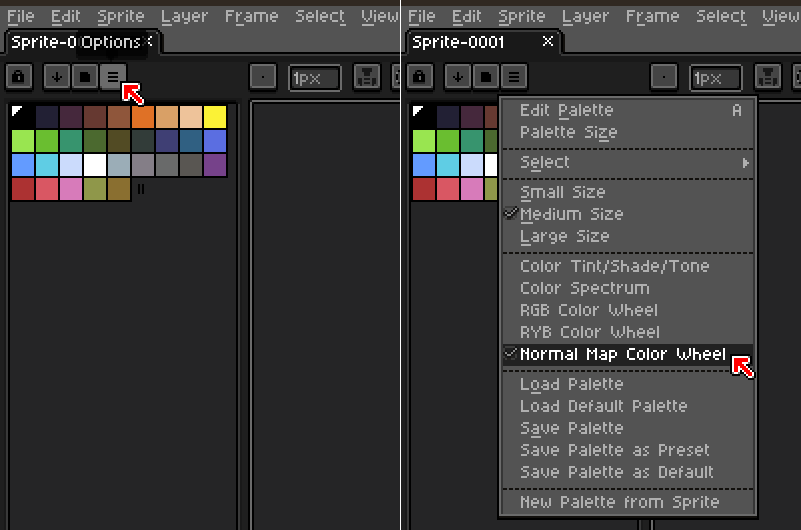
Also, if you want to create a Normal Map palette instead, Aseprite will make it automatically from any Normal Map image that you open, e.g. Examples/Reference images included in NM Inspector package.
Also please remember in Aseprite the RGB Color Mode must be selected, as the Indexed one isn't supported.
Oh thank you for the reply!
So I have an indexed palette I use that I created unfortunately, will I now then just need to map out every sprite frame essentially?
If there is a good video reference for how to properly normal map it would be great help as I haven't seen much resources on youtube.
Hey, thanks very much for making this! The plugin is working great with Krita! I've got a couple of issues though:
The NM Inspector UI is very small when I use HiDPI display scaling. It's not too much of a problem because the UI is quite simple so I can memorise what each option does. I'm using Fedora Linux 41 on a 13 inch laptop. I have my display scale set to 175%:
Krita on the left, NM Inspector on the right
When I use other Godot programs, like the Godot editor or RPG in a box, they have a UI scale setting which lets me manually increase the scale of the UI.
Secondly, the 'Coarse' normal map is *so close* to being a perfect reference palette for me. It's so easy to visualise which direction each swatch points in based on the size of the swatch. However, all of the values I'd like to sample sit *in between* swatches. If it was rotated half a swatch it would be perfect.
I want to take the normal values for the faces that point up, down, left, right, and in the 45 degree diagonals, but the values of these always fall between 2 swatches. Therefore, there are no swatches in this reference which I can use.
Screenshot of the 'Coarse' reference image, with the irrelevant parts blacked out. Note how the 0, 45 90, 135 etc. degree faces do not have swatches in this reference. The closest values are 7.5 degrees away (e.g if I wanted to sample a face that's at an angle of 0 degrees, the closest values would be for faces that are at an angle of -7.5 or +7.5 degrees)
I'll keep an eye out for any future releases which could help with these. Thanks again for your work, and I will happily donate for the above changes
Thank you for pointing that out! Here is a fixed version.
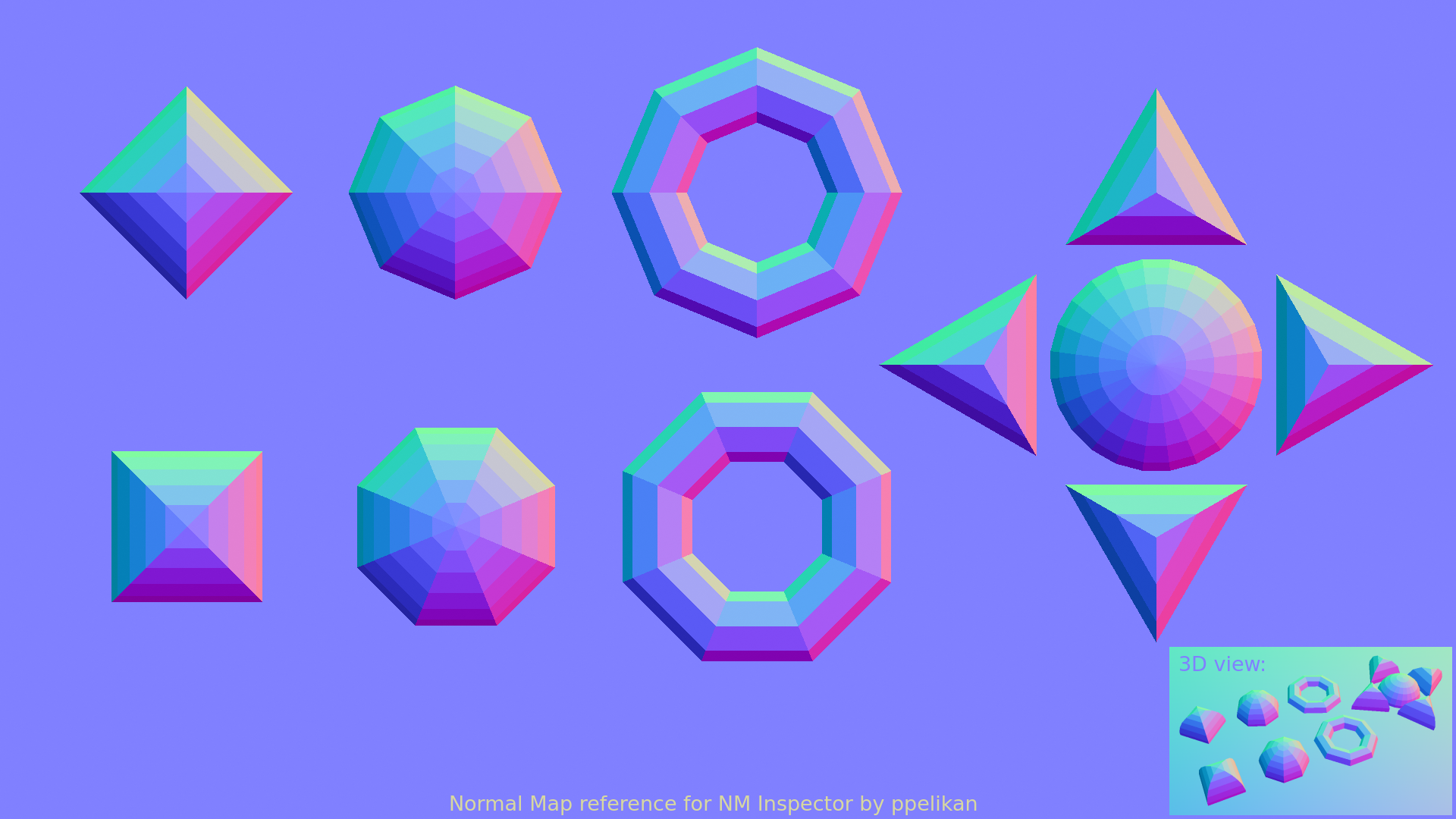
As for the UI problem your'e facing, unfortunately it will take much more time, as I need to not only come up with good solution, but also need to build it for all platforms and then, test if everything works on Win, Linux and Mac. (without access to a Mac device it is very hard for me), so please be patient :)
Thank you so much for the new reference image! That's amazing!
No worries with the UI scaling. It sounds like a difficult problem to solve. As it is, the NM Inspector app is already very useful for me, so thank you for your work. I sent another $5 as a little thank you.
All the best!
Just made an update and interface scaling is now available.
Press "F5" or "`" (backtick) key to adjust
Thank you!
Thanks so much! Works great!
I'm having a big issue! When I download the zip file, I cannot unzip it. it appears to be corrupted.
I can recommend you to check the following:
same issue, but using 7zip to unzip it worked for me
This is the future of pixel art games